In this article:
- What to Know About Your SSS Retirement Benefit
- Who’s Eligible for SSS Pension?
- SSS Pension Requirements and Application Process
- How Do You Compute Your SSS Pension?
- How Much is the Maximum SSS Pension Monthly?
- The 2025 to 2027 Pension Reform Program
- Using SSS Pension Calculator
- Taking Charge of Your Retirement
You may have imagined yourself living near the beach or traveling the world after 60. But making those dreams a reality requires careful financial preparation. Take a step toward your retirement goals by learning how Social Security System (SSS) pension computations work.
This guide explains how to compute SSS pension manually or using the official calculator. It also covers SSS pension eligibility, requirements, and the application process.
What to Know About Your SSS Retirement Benefit
The SSS retirement benefit serves as a long-term income support system that helps members transition from active employment to retirement with greater financial stability.
Instead of relying on personal savings, you can draw from a structured benefit that reflects your contributions, giving you a more reliable financial foundation in your later years.
Depending on your contribution history, this benefit may come as a regular monthly pension or a one-time payout. For many retirees, the monthly pension becomes a steady source of income for everyday expenses, with added support like the 13th-month pension every December.
Who’s Eligible for SSS Pension?

To qualify for the SSS retirement benefit, you must meet the following age and contribution requirements.
- Age: At least 60 (optional) or 65 (mandatory)
- Note: Adjusted for mineworkers (50/60) and racehorse jockeys (55)
- Contributions: At least 120 monthly contributions prior to the semester of retirement to qualify for a monthly pension
- Note: Members with fewer than 120 contributions will receive a lump sum instead.
Pro Tip: To ensure you never miss a contribution and reach that 120-month milestone, you can use GCash to set up recurring payments. You can even use GSave to further boost your personal savings for the future.
Important Reminder on Re-Employment:
If you choose optional retirement (at age 60) but later decide to return to work, your pension will be suspended. Your monthly payouts will automatically resume once you fully retire again or reach the mandatory age of 65.
SSS Pension Requirements and Application Process
Filing for your retirement benefit is now more convenient as SSS has transitioned to a digital-first application process through the My.SSS.
My.SSS is a platform that lets you access records and manage transactions like loan and benefit applications, so ensure your mobile number and email address are updated.
For regular employees, your employer submits Employer Certification of Separation/Retirement via E-Services.
Follow these simple steps to secure your hard-earned benefits and transition into a worry-free retirement.
- Secure an enrolled disbursement account. You must have an active bank account or e-wallet to file a claim.
- Visit an SSS branch near you to request a Letter of Introduction (LOI) to help facilitate the opening of your dedicated pension account at a partner bank.
- Create or log in to your My.SSS account.
- Enroll your disbursement account. Go to “Services” > “Disbursement Account Enrollment Module (DAEM).” Use a PESONet participating bank or a fully verified GCash account.
- Upload your verification documents. Submit clear photos of the requirements that the system will ask you to attach.
- Proof of your disbursement account, such as a bank passbook or ATM card with your name and account number. For GCash, you can submit a screenshot of your profile using the app.
- A clear copy of a government-issued ID
- Selfie holding your ID and proof of disbursement account
- Submit your retirement claim. Once your disbursement account is approved, go to “Benefits” > “Retirement Claim,” and follow the instructions.
- Track your application. Check your email or My.SSS inbox for your transaction number and status updates.
Your name on your bank account or e-wallet must match your registered SSS name for approval. SSS will notify you via email and My.SSS inbox if your disbursement account is approved.
Note that any missing contact information or discrepancies in your records can cause you delays or prevent you from proceeding with your online application. If this occurs, schedule an appointment online at your My.SSS portal for the nearest SSS branch to avoid queueing.
How Do You Compute Your SSS Pension?

Image Credit: SSS
- AMSC (Average Monthly Salary Credit): To compute average monthly salary credit, take the average of your last 60 monthly salary credits (MSCs) or the total sum of all MSCs divided by the number of months paid, whichever is higher.
- CYS (Credited Years of Service): The total number of years you have contributed to SSS.
How is monthly pension calculated?
SSS determines your monthly payout by comparing three different results and selecting the highest one for your benefit. All pensioners are also entitled to an additional ₱1,000 benefit allowance.
What’s the formula for calculating a pension?
While the SSS portal automatically flashes an estimate during your application, you can calculate it yourself using the three official formulas below. Depending on your history, SSS applies one of these to calculate your SSS pension.
SSS Pension Computation 1: The 40% Rule
While this is the most straightforward formula, it typically applies to SSS members with shorter service histories. For example, nearly 10 years.
| SSS Pension Computation 1 | ||
|---|---|---|
| Formula | Sample | Estimate Pension |
| AMSC x 40% + ₱1,000 | ₱20,000 x 0.4 + ₱1,000 | ₱9,000 monthly |
| Assuming AMSC is ₱20,000 | ||
SSS Pension Computation 2: For Long-Term Contributors
SSS applies this formula to members who’ve contributed for 20 years or more.
| SSS Pension Computation 2 | ||
|---|---|---|
| Formula | Sample | Estimate Pension |
| ₱300 + (20% x AMSC) + [2% x AMSC x (CYS–10)] + ₱1,000 | ₱300 + (0.20 X ₱20,000) + [0.02 x ₱20,000 x (40-10)] + ₱1,000 | ₱17,300 monthly |
| Assuming AMSC is ₱20,000 and CYS is 40 | ||
SSS Pension Computation 3: Minimum Pension
The third SSS formula sets a guaranteed minimum base pension by CYS, plus ₱1,000 allowance.
- ₱1,200 base (10+ years CYS) = ₱2,200 total monthly
- ₱2,400 base (20+ years CYS) = ₱3,400 total monthly
How Much is the Maximum SSS Pension Monthly?
Because the AMSC is capped at the highest salary credit (currently ₱30,000 in 2026), your pension scales relative to your highest contributions and total years of service.
The 2025 to 2027 Pension Reform Program
Following a landmark reform implemented in September 2025, SSS is currently in the middle of a historic three-year pension increase. This program boosts monthly payouts for all types of pensioners without requiring additional contribution hikes.
- Retirement and Disability Pensioners: A 10% increase is applied every September from 2025 to 2027. By the end of the rollout, your total pension will have increased by approximately 33% from its 2024 level.
- Death and Survivor Pensioners: A 5% increase is applied every September over the same period, totaling a 16% overall increase by 2027.
Note: These increases are automatically applied to your monthly payout every September, provided you were a qualified pensioner as of August 31 of that year.
Using SSS Pension Calculator
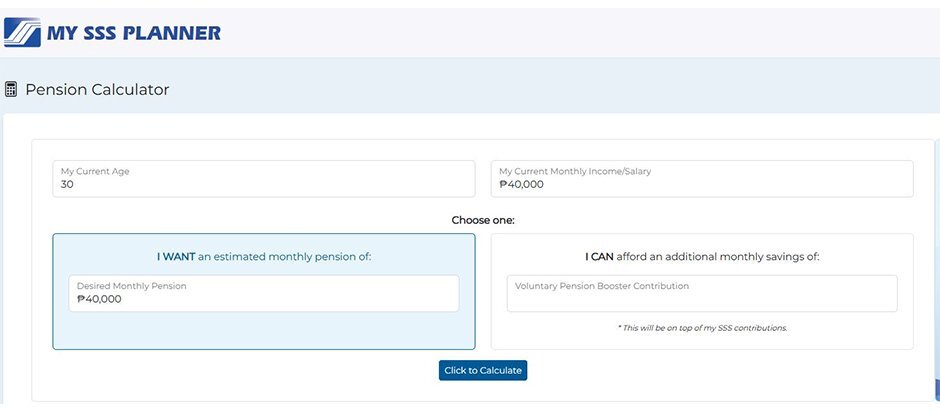
Image credit: SSS
The official SSS pension calculator helps you estimate benefits and plan contributions. It’s accessible via the My.SSS portal or SSS website. To ensure your data syncs correctly, even while you’re on the go, it helps to have a stable internet connection. You can use prepaid data for budget-friendly flexibility or opt for postpaid data for uninterrupted access to all your government accounts.
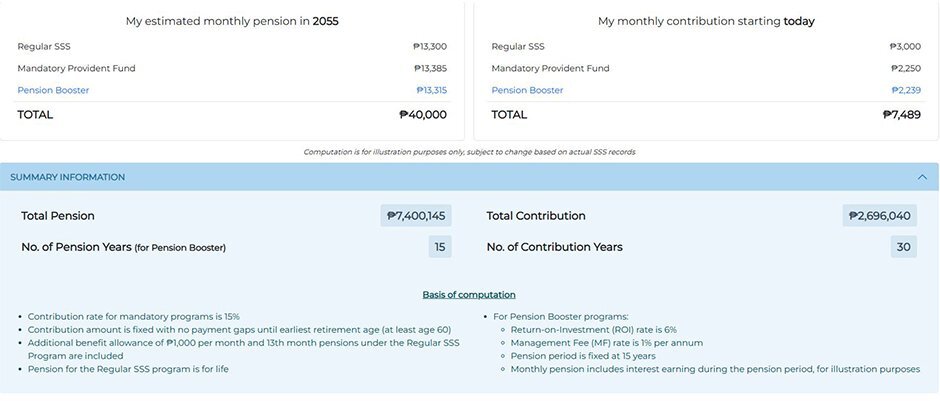
Image credit: SSS
The SSS retirement calculator also shows potential returns if you join the government agency’s “Pension Booster.” Formerly known as WISP Plus, this voluntary, tax-free investment scheme requires a minimum contribution of only ₱500 and offers a target interest rate of up to 7.2%.
Taking Charge of Your Retirement
The SSS pension calculator shows the ideal amount to contribute. But since it doesn’t consider any salary changes or job switches, it helps to understand SSS pension computation, so you can have a more precise view of your financial future.
If your projected payout is lower than expected, take it as a valuable head start to adjust your saving and budgeting efforts. Strengthening your financial literacy now empowers you to take control of your journey and ensures you’re well-equipped to achieve your retirement goals.
When reviewing your pension estimates, updating your My.SSS account, or managing your contributions, having a stable internet connection makes the process smoother. With a reliable setup at home, you can easily access the SSS pension calculator and stay on top of your financial plans without interruptions. Options like GFiber prepaid offer budget-friendly, reloadable home internet with no lock-up, while GFiber postpaid provides consistent, high-speed connectivity with a convenient monthly billing scheme.
Remember, the earlier you plan, the more your retirement savings grow. So, start today and secure the future you’ve earned. You got this!