In this article:
Looking for a convenient way to top up your favorite games? GCash offers a variety of options to fuel your gameplay, so you can keep playing without interruption! This guide shows you all the ways you can use GCash to buy in-game currency for Mobile Legends: Bang Bang (MLBB), Valorant, Genshin Impact, and more.
1. Top Up Instantly on the GCash App

Need to top up your MLBB diamonds or Valorant Points in a hurry? You can use the GCash app. Here's how it works:
- Open the GCash app.
- Tap "Load" on the dashboard.
- Select the "Non-Telco" tab.
- Tap "Next."
- Choose "Game Credits."
- Select the game you want to top up.
- Enter the amount you want to top up.
- Complete the transaction.
2. Link to Your App Store for Easier Purchases
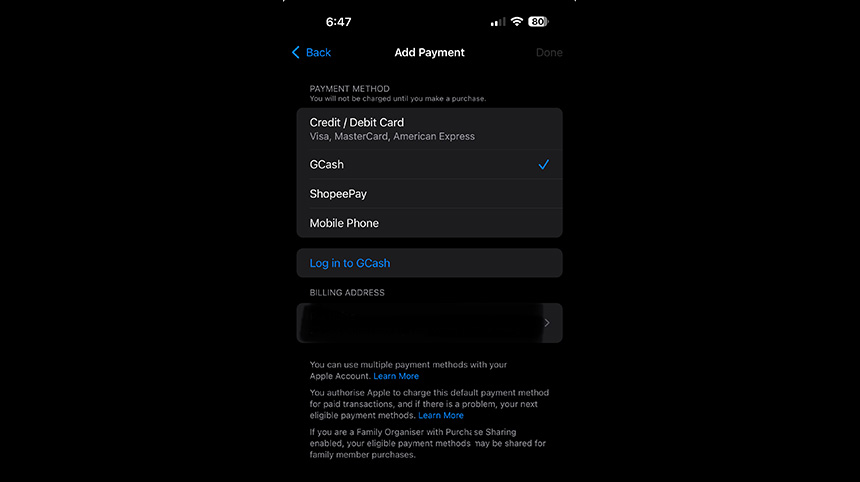
Link your verified GCash account to the Google Play or Apple Store account for seamless in-app purchases. This lets you use your GCash balance every time you make a purchase within a game.
In the Apple Store:
- Open the "Settings" app on your iPhone or iPad.
- Tap on your Apple ID.
- Select "Payment & Shipping."
- Tap "Add Payment Method."
- Choose "GCash" and follow the prompts to link your account.
In the Google Play Store:
- Open the Google Play Store app.
- Tap on your profile icon.
- Go to "Payments & Subscriptions."
- Select "Payment Methods."
- Tap "Add GCash" and follow the on-screen instructions to link your account.
Pro Tip: Use a Go+ Promo and choose a GoPLAY booster to get extra data for your favorite mobile games. This way, you can enjoy uninterrupted gaming without worrying about data charges.
3. Buy Directly In-Game
You can also use GCash to buy in-game currency without leaving your game. Just purchase items directly through their in-game stores using GCash as a payment option.
4. Check Out Gamer Grounds

Participate in events and tournaments, earn rewards, connect with the community, and purchase those Valorant points, MLBB diamonds, or CODM Garena Shells on Gamer Grounds.
Follow these steps to get started:
- Go to Gamer Grounds.
- On the homepage, tap the "Shopping Cart" icon on the navigation bar or "Trending Items."
- Select your game (MLBB, Valorant, Honor of Kings, and more).
- Choose the amount of in-game currency you want to buy.
- Select GCash as your preferred payment method.
- Complete your purchase.
You can also use the GlobeOne app to access Gamer Grounds. Open the app and go to "Essentials" at the bottom of the homepage. Then select "Passions/Engagement" and tap on "Gamer Grounds."
5. Explore Partner Websites

Want to save money on game credits and items? GCash partners with popular platforms that often have lower prices than buying directly from the game.
Some sites to try:
- Codashop: A haven for gamers seeking the best deals on in-game currencies and items. Snag those Valorant Points, Genshin Impact Crystals, Garena Shells, and more with just a few taps!
- UniPin: Top up a massive selection of games, including Mobile Legends, PUBG Mobile, Free Fire, and many others.
- Razer Gold: This virtual credit lets you top up your favorite games and score exclusive promos and rewards. Fund your Razer Gold account easily using GCash.
Select a platform, find the game you want to reload, and choose the in-game currency or item you need. During checkout, choose GCash as your payment option.
6. Try Third-Party Resellers
You'll find many third-party resellers online on Facebook, TikTok, and other sites. They often offer competitive prices on in-game tokens and items as well as accept GCash. But it's important to be cautious. Follow these tips to stay safe:
- Check the seller's reputation. Look for reviews and ratings from other buyers.
- Compare prices to make sure they’re reasonable and in line with the market value. If a deal seems too good to be true, it probably is.
- Be wary of scams and sellers who ask for your login credentials or other sensitive information. Never share your passwords or account details with anyone.
- Trust your instincts. If something feels off about a seller or a deal, trust your gut and walk away.
Stay Safe with These Top Up Tips

Before you rush to top up your account, keep these tips in mind to ensure a smooth and secure experience:
- Double-check your game ID to ensure you're topping up the correct account.
- Never share your password—legitimate sites and sellers will never ask for it.
- Be aware of potential transaction fees.
- Keep your account information secure and be cautious of phishing attempts.
Level Up Your Game
GCash makes it easy to top up, whether you're grabbing those last-minute MLBB diamonds or stocking up on Valorant skins and Genshin Impact Crystals. It's your all-in-one app for gaming, bills, shopping, and more! So, level up your gaming, go forth, and dominate!