In this article:
Ever run out of load when you need it most—maybe to book a ride, check an urgent email, or call family? Knowing how to load your Globe prepaid quickly can help you avoid these frustrating interruptions. This guide will walk you through five easy, up-to-date ways, from popular apps you might already use to your trusted local retailer. Learn to reload effortlessly and stay connected without missing a beat!
How to Load Your Globe Prepaid
Thankfully, keeping your line topped up is simple. Here are the most popular and reliable options.
1. The GlobeOne App: Your All-in-One Loading Hub

Use the GlobeOne app to add load and easily manage your prepaid account anytime. It's convenient, fast, secure, and gives you plenty of payment choices, usually with no extra fees for loading directly! You can easily figure out how to load your Globe prepaid or how to check your prepaid load for Globe on the dashboard, earn Rewards points with your transactions, and track your promo subscriptions!
How it works:
- Download and install the GlobeOne app.
- Register or log in using your mobile number.
- On the app's dashboard, tap "Load."
- Select the account or enter the prepaid number you want to load.
- Choose the load amount you need.
- Select your preferred payment method.
- GCash: You can save your account for faster future transactions.
- Credit/Debit Card: Mastercard, Visa, JCB
- E-wallet like ShopeePay, GrabPay
- Direct Bank Transfer via BPI, RCBC, UnionBank—availability may vary
- Follow the prompts to complete the payment securely.
2. GCash App: The Power of Mobile Money
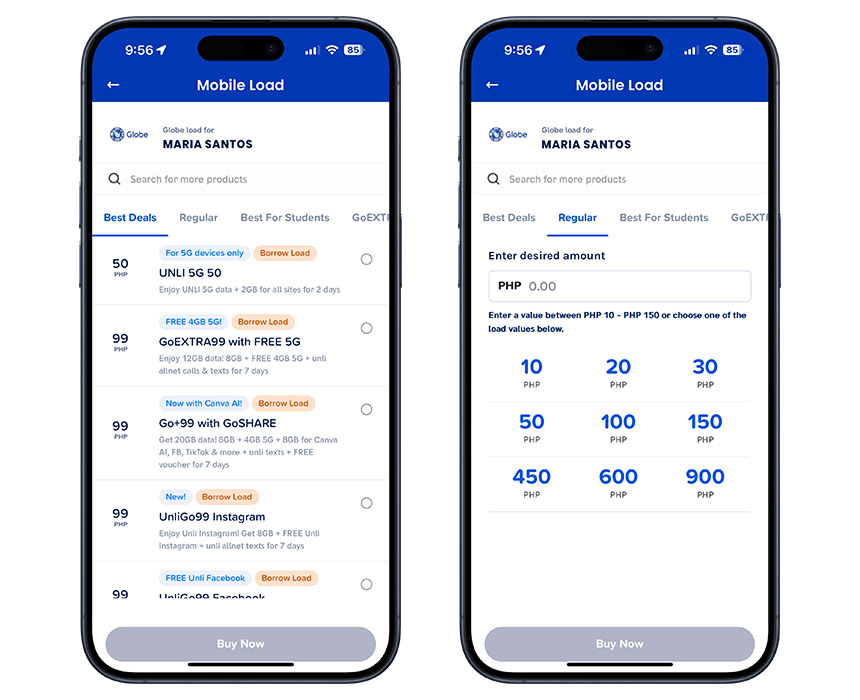
GCash provides another easy option for buying your Globe prepaid load online. It’s incredibly convenient, particularly if you're already a GCash user. Loading up is fast, and the e-wallet often features exclusive promo deals just for you. You can also choose to “Send” and “Borrow load” (subject to eligibility).
How it works:
- Open your GCash app.
- Tap the "Load" icon on the dashboard.
- Select the Globe icon on the “Mobile Load” page.
- Enter the Globe prepaid number you wish to load.
- Choose from the available Globe promos or select the “Regular” tab and tap on the load amount you prefer.
- Confirm the details and tap "Buy Now."
Note: Many e-wallet apps—such as GrabPay Wallet, ShopeePay, and Coins.ph—offer similar built-in features for buying load directly within their respective applications.
3. Online Banking Apps and Websites
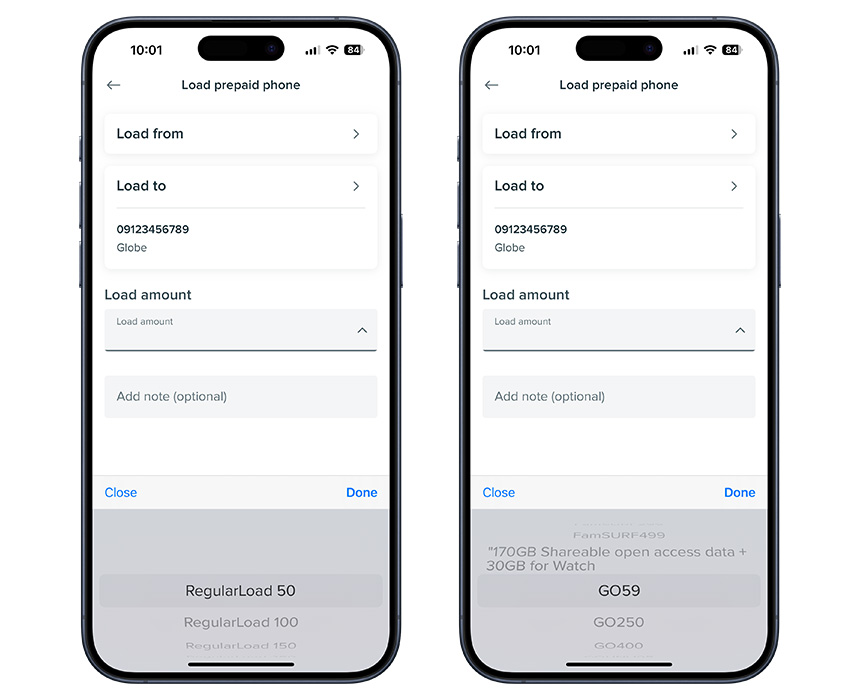
You can also buy prepaid load via most major banks' online sites or mobile apps like BPI, BDO, and Metrobank, among others. This is a secure and convenient option—check your specific bank's app or website to confirm availability.
Here’s how it works using the BPI app (exact steps subject to app updates).
- Launch your BPI Mobile app and log in.
- Tap the ”Pay/Load” tab found at the bottom.
- Select the “Prepaid Phone” option.
- Tap “Load From” and select the BPI account you'll be paying with.
- Then tap “Load To” and select Globe as the service provider.
- Enter a prepaid phone number. A pop-up will then appear where you can scroll and choose from regular loads or prepaid promos.
- Tap “Continue” and review the payment summary. Check that the details are accurate, and then tap “Confirm” to complete the payment.
Quick Security Tip: Whether you're using banking apps, e-wallets like GCash, or GlobeOne, always make sure to download the official apps only from trusted sources like Google Play Store or Apple App Store. Protect your account passwords or MPINs, and never share the One-Time PINs (OTPs) sent to your phone to authorize transactions.
4. AutoLoadMax and Retail Loading Stations
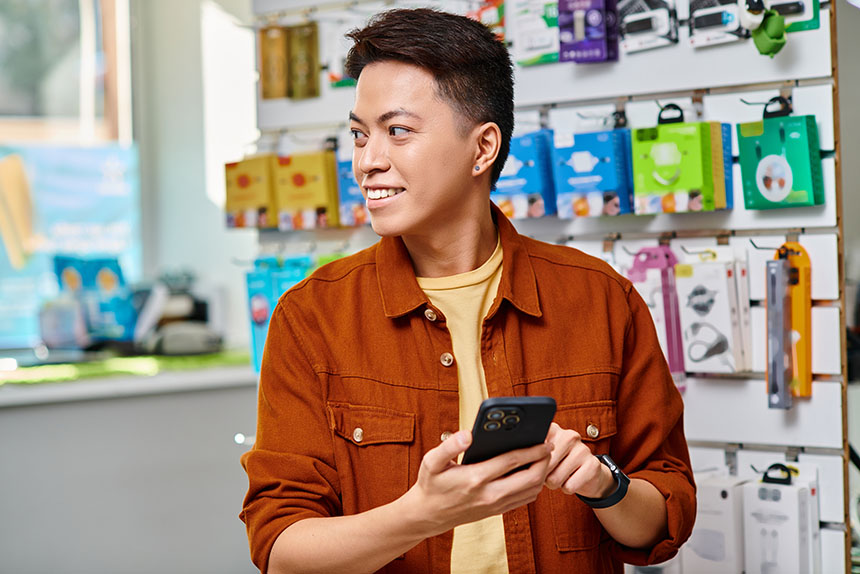
If you’re not online often or don't have app access, you can load up at retail stores using AutoLoadMax. Retailers use this electronic loading service to send load credits like ₱50, ₱100, or other specific amounts you need directly to your Globe number, making this reliable and widely accessible option perfect for cash payments.
How it works:
- Visit any authorized Globe load retailer.
- Your neighborhood sari-sari store displaying the AutoloadMax sign
- Convenience stores (like 7-Eleven)
- Supermarkets and Malls
- Globe Stores
- Provide the retailer with your Globe prepaid number and the amount you wish to load.
- Pay the retailer in cash.
- You'll receive a text confirmation once the load is successful.
5. Other Popular Mobile Apps

Beyond the dedicated telco and bank apps, you can often conveniently buy load through other popular mobile apps you use daily for shopping, payments, or errands. Many major e-commerce platforms and retail store apps like Lazada, Shopee, Puregold Mobile, and the CLiQQ app now include a feature to purchase mobile load directly.
How it works (general steps):
- Open the specific app you want to use (Lazada, Shopee, Coins.ph, etc.).
- Look for menu options like “Buy Load,” “Load, Bills & Travel,” “Digital Goods,” or something similar.
- Select the “Mobile Load” option and choose Globe as the provider.
- Input the 10-digit Globe prepaid number you're loading and select the specific regular load amount or promo you want.
- Choose your preferred payment method from the options available.
- Double-check all the details and confirm the transaction to complete your purchase. Some apps like CLiQQ might have a slightly different final step, like generating a barcode to pay cash at a physical counter.
Frequently Asked Questions (FAQs)
Q: How do I buy more data for my phone or subscribe to promos?
A: The easiest way is through the GlobeOne app. You can browse all the available promos in the “Shop” tab and the “Buy Globe Prepaid Promos” section. You can also check GCash and your bank for promo loading options.
Q: How can I extend my Globe load or promo validity?
A: Regular load usually has a set validity depending on the amount. To keep your line active longer, either load regularly or subscribe to promos offering longer validity periods (7, 15, or 30 days). Always check the specific promo details when you subscribe.
If you need to extend the life of an existing promo you're already subscribed to, explore GlobeOne for add-on options that might be compatible with your current subscription. Try GoLONGER10, a ₱10 add-on that could extend your Go or Go+ promo validity by 1 day. Or check out GoRENEW, which automatically renews specific promos after they expire.
Q: How do I transfer load to another Globe prepaid number?
A: Now that you know how to buy your Globe prepaid load online, you can easily transfer or share load through the same digital channels.
- GlobeOne App: Go to “Buy Load” and enter the prepaid number you want to load.
- GCash App: As with GlobeOne, enter the recipient's Globe prepaid number on the “Mobile Load” page.
- Online Banking: Check your bank's mobile app or website. Some banks might include a “Share-A-Load” or “Transfer Load” option within their telecom or loading services menu.
Q: What should I do if my load doesn't arrive after purchasing?
A: Start by waiting a few minutes and checking your updated balance on the GlobeOne app. If the load still hasn’t reflected after about 15 to 30 minutes, you can get help through Globe’s digital support channels. You can chat with support or raise a concern directly through the GlobeOne app, or visit Globe’s Help pages online for quick answers and guided support options.
If you prefer to speak to a representative, you may also reach Globe through their hotline alternatives by dialing 211 from your Globe mobile or (02) 7730-1000 from a landline, free of charge. Be sure to have your transaction reference number ready for faster assistance.
Stay Connected Effortlessly
Now you know exactly how to load your Globe prepaid account using the most convenient methods available today. From the GlobeOne app and GCash to online banking and accessible retailers, keeping your line active is simpler than ever. Choose the option that best suits your needs, load up, and continue making those important connections, sharing your moments, and exploring the digital world.