In this article:
You grab your phone to make that important call or send a quick text message, but suddenly realize it won't go through! If your mobile service is inactive due to an unpaid bill, you're in the right place. With this guide, you can learn how to reconnect your Globe postpaid line and where to pay your Globe bill to get it working again.
The most important step is to settle your total outstanding balance in full. Remember, prolonged disconnection first blocks your outgoing calls and texts, then stops incoming ones, too. You’ll also forfeit your accumulated Rewards points and could eventually lose your mobile number permanently. Explore four ways to handle your payment, so you can start calling and texting again.
Easy Ways to Pay
Here are four Globe payment channels to help restore your connection.
Pay via the GlobeOne App

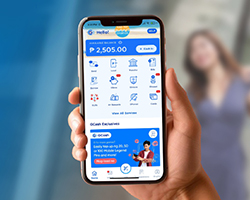
Wondering how to view your Globe billing statement online? The GlobeOne app is your go-to portal for managing your Globe accounts and offers real-time, same-day payment posting. This means the reconnection process starts much faster—a key advantage over channels like bank payments, which can take two to three banking days to post.
Here’s another perk: Postpaid customers earn one Rewards point for every ₱50 paid via GlobeOne, and one Rewards point for every ₱200 when using other channels.
- Log in to the app. From the app's main dashboard or homepage, tap on your Globe Postpaid account details.
- View your total outstanding balance. Tap the "Pay Now" button to begin the payment process.
- Select payment method. Double-check that the account details are correct. Enter the amount you wish to pay, ensuring it covers the full outstanding balance needed for reconnection. Then, choose your preferred payment method from the options provided:
- GCash
- Credit/Debit Card
- Other e-wallets (like GrabPay)
- Direct bank debit or transfers from major banks like BPI, RCBC, Unionbank, and more
- Finalize payment. Carefully review all the details on the confirmation screen, then tap "Pay Bill" or the final confirmation button to submit your payment.
- Wait for confirmation. Thanks to real-time posting on the app, the reconnection process for your postpaid line typically starts quickly, usually within two hours after payment.
Pay via GCash

Using GCash is another quick and secure method for Globe online payments. Here’s a simple guide.
- Launch GCash. Tap on the "Bills" icon, usually found on the main dashboard.
- Find Globe postpaid biller. You can tap on the "Telecoms" category and scroll to find "Globe Postpaid.” Alternatively, you can use the search bar at the top and type in "Globe Postpaid."
- Enter payment details.
- Globe account number or mobile number
- Exact amount: Ensure this covers the total outstanding balance for reconnection
- Email address: Optional, but required for receiving an e-receipt
- Confirm and pay. Make sure you have sufficient funds in your GCash wallet to cover the payment. If everything looks correct, tap "Confirm" to proceed.
You can generally perform similar steps using the "Pay Bills" feature in other digital wallets like ShopeePay, GrabPay, and more. Just look for Globe Postpaid or Globe Telecom under their list of billers.
Pay via Online Banking
Most major banks in the Philippines allow you to settle your Globe bills directly via their official mobile app or website.
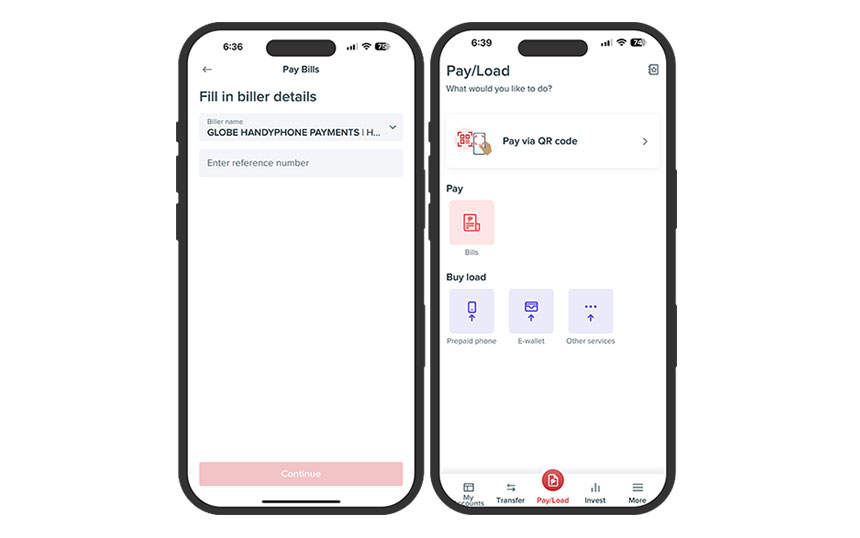
You'll need to log in to your bank's app or online platform, navigate to the "Bills Payment" section, and select Globe Telecom as the biller (you might need to enroll Globe as a biller first). You'll then enter your Globe account number and the payment amount and follow your bank's authorization steps (like entering an OTP).
Here’s a walkthrough of how you might typically pay using the BPI app. The exact steps are subject to app updates.
- Launch your BPI Mobile app and log in.
- Select “Move Money” found at the bottom.
- Tap “Pay Bills.” Choose the “BPI account” you'll be paying from, then tap “Pay To.”
- Select the “All Billers” tab. Search for “Globe” and choose the correct biller name (often listed as “GLOBE HANDYPHONES PAYMENTS” or similar for postpaid mobile).
Tip: You can usually add Globe as a “Favorite Biller” during this step to make future payments faster. - Enter your Globe account or mobile number (usually required as the reference number) and the exact payment amount. Tap “Continue.”
- Carefully review the payment summary. Check that the Globe account number and amount are accurate, then tap “Confirm” to complete the payment.
Visit Accredited Payment Centers

If you prefer paying in person or don't have access to digital methods, authorized payment centers remain a valid option among the available Globe payment channels.
- Where: You can pay at places like Bayad Center, 7-Eleven, Cebuana Lhuillier, SM Bills Payment counters, and other accredited partners.
- How: Give the cashier your Globe account number and the payment amount. Remember to keep the receipt they give you.
After You Pay: The Reconnection Process
Once Globe's system successfully registers your full payment, the reconnection process starts automatically. Expect restored services within two to 24 hours after payment. Remember, GlobeOne and other digital payment channels often post payments faster. Always keep your transaction receipt or a screenshot as proof of payment.
If more than 24 hours have passed since you posted the payment and the service is still unavailable, here’s what you should do.
- Try Globe's digital support first. Have your proof of payment handy. You can reach out via the "Help & Support" section in the GlobeOne app or try any of the Globe hotline alternatives.
- Visit a store. If you suspect complex issues with your account, visit a Globe Store with your ID and proof of payment.
Tips to Avoid Future Disconnection

o keep your Globe Postpaid line active and avoid service interruptions, follow these essential tips.
- Pay on time. This is the most crucial step. Remember that Globe may charge a late payment fee of ₱50 on your next bill.
- Use GlobeOne to stay informed. The app allows you to check your bill and due date to help prevent missed payments.
- Set up Auto Pay. For a “set-and-forget approach,” consider enrolling your account in an Auto-Debit Arrangement via your bank account or an Auto-Charge via your credit card. This automatically pays your bill on time, provided you have sufficient funds or credit.
- Enable payment reminders. Don't rely solely on memory. Use your phone’s calendar, reminder apps, or alert features within some banking apps to set notifications a few days before your payment due date.
- Know your billing cycle. This helps you anticipate and budget for your payment. You can usually find this on your bill or within the GlobeOne app.
- Opt for e-statements. Consider going paperless by subscribing to e-statements. They arrive quicker than paper bills, and are easier to access and archive.
Get Back Online and Stay Connected
Reconnecting your postpaid account is simple with these convenient options. By settling your balance using your preferred payment channels, you can restore your service quickly and efficiently. To simplify managing your account, download the GlobeOne app. It’s perfect for paying bills, checking your bill, monitoring data usage, and discovering rewards all in one place!