In this article:
Welcome to your adulting era! Landing your first job is an exciting milestone that opens the door to new opportunities and responsibilities you may be handling for the first time. As a newly hired employee, you’re now required to pay taxes, which means you’ll need a Tax Identification Number (TIN).
If you’re feeling unsure or lost, you’re not alone. Many first-time employees wonder how to apply for a TIN themselves and what documents they need. That’s why we’ve created this guide to help you understand the TIN ID application requirements and process with ease.
What’s a TIN and Why You Only Need One
A TIN is a permanent, unique, system-generated nine-digit number assigned by the Bureau of Internal Revenue (BIR) to individual taxpayers. It’s required for anyone who earns income in the Philippines.
The BIR uses your TIN to keep track of your tax records, filed returns, and other transactions with the agency. It helps ensure that your taxpayer information is accurately recorded and properly managed.
Since the BIR allows only one TIN per taxpayer, having multiple TINs may result in penalties. Whether you change jobs, start a business, become self-employed, or acquire property, you should continue using your existing TIN for all tax-related transactions.
How to Apply for Your TIN
Most Philippine-based companies handle TIN registration for first-time employees as part of the hiring process, making employment one of the most common ways to get a TIN. But whether your employer can apply for it on your behalf depends on your situation.
HR-Assisted Application
If you’re a fresh graduate or just starting your first job, there’s a good chance your company’s Human Resources (HR) or payroll team will help you secure your TIN. This is done as part of pre-employment requirements or onboarding, so you won’t have to handle everything on your own.
You can expect the following in an HR-assisted application.
- Your employer may guide you on the required forms and documents, such as valid IDs and completed BIR forms.
- Some companies coordinate directly with the BIR or use accredited representatives to process group applications.
- The TIN is typically processed alongside your employment registration, so you can be properly enrolled in payroll and tax reporting systems.
When You May Still Need to Apply on Your Own
Even though many first-time employees get help from HR, there are situations where self-registration is needed for your TIN. This may happen if any of the following apply.
- Your employer requires you to already have a TIN before you start onboarding.
- Your company doesn’t process or facilitate TIN applications.
- You’re registering an additional source of income, such as freelance or part-time work, alongside your job.
If any of these apply, you may have to complete your TIN application directly through a BIR Revenue District Office (RDO) or via the ORUS (Online Registration and Update System), depending on your taxpayer classification.
In these cases, make sure your registration details, such as your RDO assignment and taxpayer type, are correctly encoded to avoid issues with future tax filings.
TIN Application Requirements
Like most official applications, getting a TIN becomes much easier when you come prepared. So, have the right documents and details ready.

- Accomplished BIR Form 1902: This form is specifically for individuals registering as employees earning a salary.
- Any government-issued ID: Your ID must show your full name, birthdate, and address. If your ID doesn’t have an address, you may be asked to provide additional proof of residence or business address. You may present a National ID, Philippine Passport, Driver’s License, Social Security System (SSS) ID, or Professional Regulation Commission (PRC) License as proof of identity.
- Marriage Certificate (if applicable): This is only required for married applicants. Secure a copy issued by the Philippine Statistics Authority (PSA).
How to Apply for a TIN Through ORUS
Registering for your TIN on your own is easy. You can apply for a TIN number online through ORUS.
This official 24/7 web-based portal from the BIR allows taxpayers to complete and update their records entirely virtually, without the need to visit a physical RDO.
To begin, you’ll need an ORUS account to proceed with your TIN application.
Step 1: Create an ORUS account.
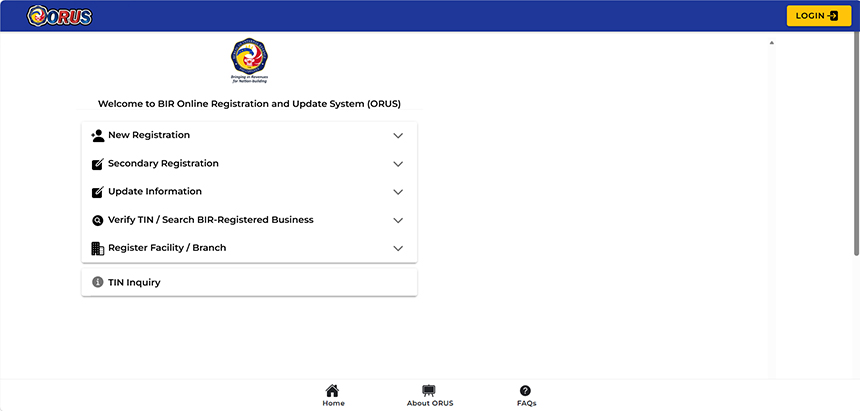
- Go to orus.bir.gov.ph. Tap “New Registration” and choose “As an Individual.” Under the list of documentary requirements, click “Create an Account” at the bottom.
- Select “Taxpayer” and tap “Without Existing TIN.” Another pop-up will appear to remind you that having multiple TINs is criminally liable. Confirm by clicking “I Agree.”
- In the “User Type-Transaction” dropdown menu, choose “Get TIN for Filipino Citizen-E.O. 98/One Time Taxpayer.”
- Fill out the form and click “Register” once done. Use an active email address, as this will be your log-in credentials for all BIR-related registration and update matters.
- Check your inbox for the ORUS verification email. If nothing appears, check your spam folder. Once verified, log in to ORUS using your email and password.
Step 2: Accomplish the online TIN application form.
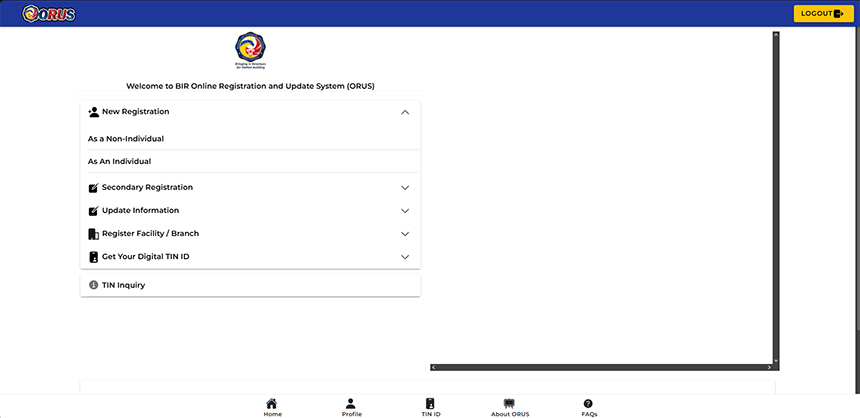
With an ORUS account, you can now register and complete your TIN ID application requirements.
- Log in to your ORUS account and select “New Registration.” Choose “As an Individual.”
- Click “Fill Up Registration Form” and enter all required details across the pages. Tap “Continue” after each one. You’ll need to upload a valid government-issued ID and a selfie holding that ID towards the end.
- Click “Continue” to review the information you’ve plugged in. If everything is correct, click “Submit Application.” You should receive an ORUS email acknowledging receipt of your application.
Step 3: Wait for approval and TIN issuance.

- Once your application is approved, your TIN will be sent to your inbox within a few days.
- Save a copy of your TIN for future use, since you’ll need it for employment onboarding, payroll processing, and other government transactions.
- If you don’t get your TIN after a few days, log in to your ORUS account to check your application status or review your registered email, including the spam or junk folder.
How to Verify Your TIN
You can do a TIN verification to ensure it’s active and correctly registered with the BIR.
- Log in to your ORUS account.
- Select “TIN Inquiry” from the available menu options.
- Enter your required personal information to retrieve your registered TIN information.
You can also check your TIN status through the BIR chatbot REVIE available on the official BIR website, which includes a TIN validation feature.
If your record doesn’t appear or you encounter issues, contact your assigned RDO for assistance.
How to Get a Digital or Physical TIN ID
Once your TIN has been issued, you can proceed with getting your TIN ID for easier access to your taxpayer details. Depending on what’s available at your RDO and the current BIR guidelines, you may be able to choose between a digital or physical version.
If you’re getting a physical copy of your ID, you can keep things on track by following these steps.
- Go to your assigned RDO or the RDO where your employer is registered, as BIR says that individuals being issued a TIN for the first time may also be issued a physical TIN card.
- Submit the required documents, which may include:
- Accomplished BIR Form 1905
- Any valid government-issued ID
- 1x1 picture
- Pay the applicable fee if required for replacement or issuance.
- Note that processing times and requirements may vary by the RDO, so it's best to contact them beforehand to confirm whether physical TIN cards are currently being issued.
Your TIN ID works as a supporting valid ID. Employers, banks, and government agencies widely accept it, making it convenient for things like opening accounts, job onboarding, and other formal requirements.
Digital TIN ID
In Revenue Memorandum Circular (RMC) No. 120-2023, the BIR strongly advises taxpayers to secure the Digital TIN ID available through the ORUS. If you already have a TIN and an ORUS account, you can generate it within minutes. You can then download and print the digital version online for use in eligible transactions, subject to BIR authentication and verification requirements.
For a detailed walkthrough, check out our guide to getting a Digital TIN ID.
Frequently Asked Questions About TIN Application

This FAQ section covers the most common concerns about the TIN application process, along with guidance on what to do next.
When should I apply for a TIN?
As per BIR, you must get your TIN within 10 days of starting your employment. If your employer includes this in onboarding, secure it as soon as possible. Coordinate with HR early so your documents are submitted on time.
What should I do if I lose my TIN Card/ID?
You can request a replacement depending on whether you have a digital or physical copy. For a digital TIN ID, simply log in to your ORUS account to download another copy.
If you lose or damage your physical TIN card, you may request re-issuance through your RDO. This typically requires an accomplished BIR Form 1905, a valid government-issued ID, and an affidavit of loss. A replacement fee of around ₱100 may also apply, based on RDO guidelines.
Where can I get help for TIN-related concerns?
You can use the BIR’s chatbot, REVIE, available on the official BIR website for common inquiries and TIN validation services. For more complex concerns, you may contact the BIR Customer Assistance Division or visit your assigned RDO or the nearest BIR office for in-person assistance. You may also call the BIR Customer Assistance hotline at (02) 8538-3200 if needed.
Entering the Working Life with Confidence
Stepping into adulthood and starting your career comes with plenty of firsts, and it’s perfectly normal to feel a little scared and lost.
Fortunately, getting your TIN ID application requirements and completing other essential government transactions, such as SSS, PhilHealth, and PAG-IBIG memberships, is now more convenient. Many of these processes can be easily completed online.
As you begin your professional journey, a reliable home internet connection helps you stay on top of requirements, learn new skills, and settle into your new role. If you’ve already settled into a place of your own, a fiber plan with uncapped speeds has you covered for work calls and productivity needs. And if you’re still finding your footing, a no-lock-in prepaid fiber gives you the same reliable speeds, without tying you down.
With the essentials in place, you can focus on what matters most: growing your career and embracing the opportunities ahead.